Back to Insights

Getting started with MORI

Sales before and after exhibitions. Start with the MORI guide that fits you.

Continue conversations with buyers you already know, or discover new buyers and build your company’s data assets. These two guides take you through the process using real MORI screens.

Choose the guide you need now

I already have buyer data01

Engaging existing buyers

Register buyers from spreadsheets, business cards, or existing contacts and organize them into a project. Follow the steps from your first proposal to reviewing results and preparing a follow-up.

  1. 1Register buyers
  2. 2Create a project
  3. 3Send a proposal
  4. 4View results
  5. 5Plan next steps with AI
I want to discover new buyers02

Discovering buyers and building data assets

Set your direction with Market Intelligence and discover buyers through Buyer Connect. Learn how to connect the results to a project and build your company’s sales data.

  1. 1Market Intelligence
  2. 2Buyer Connect
  3. 3New-buyer project
  4. 4Build data assets
  5. 5Use AI

The downloadable PDFs and actual screen previews are Korean originals.

Prepare before the exhibition. Keep the conversation going afterward.

Find buyers to meet before the exhibition, then use your meeting notes and buyer responses to prepare follow-up sales afterward.

  1. Before the exhibition

    Prepare the buyers you want to meet

    Organize existing buyers or discover new ones, then prepare your outreach in a project for each exhibition.

  2. After the exhibition

    Turn meetings into the next conversation

    Organize meeting notes and responses, review interest signals and actual replies, and prepare your follow-up buyers and proposals.

  3. For the next opportunity

    Keep the knowledge in your company

    Build new buyers and enriched information into projects and company data so you can use them for your next exhibition and sales activity.

One step at a time, on real screens

See actual MORI screens from the guides. These Korean screens were captured in November 2026 with personal information redacted. Figures are examples from the capture account.

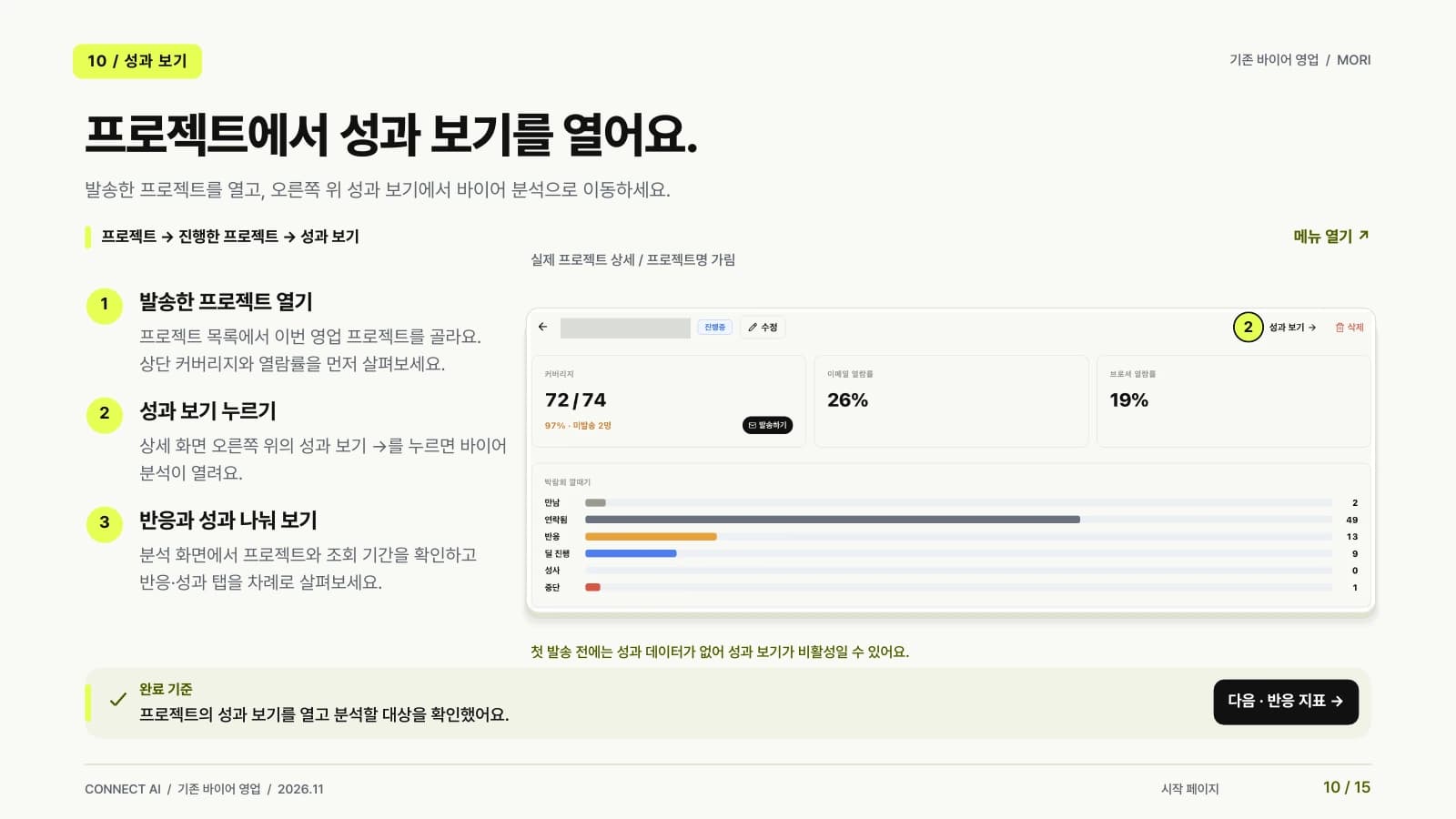
Actual MORI project View results screen from the existing-buyer sales guide. Korean original with personal information redacted.

View results in your project

The existing-buyer guide opens the project’s View results page and explains how to review the Response and Performance tabs.

Preview the existing-buyer sales PDF
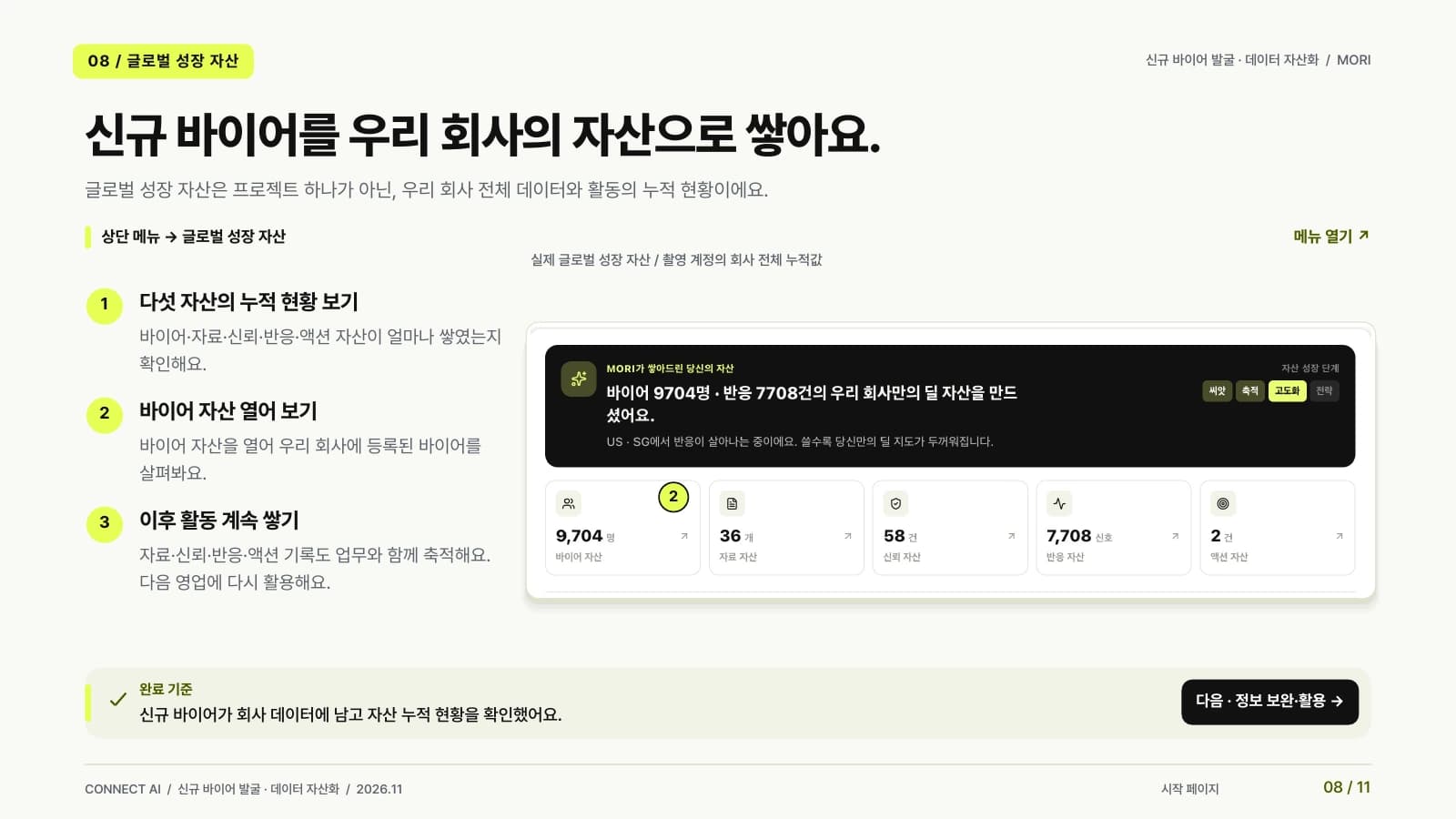
Actual MORI Global Growth Assets screen from the buyer-discovery guide. Korean original with personal information redacted.

Make discovered buyers part of your company’s assets

The discovery guide follows Market Intelligence and Buyer Connect through to the project and Global Growth Assets views.

Preview the buyer-discovery and data-assets PDF

Read the guide. Then work through your next steps with AI.

Try these prompts after connecting Connect AI to Claude or ChatGPT. Use the information available to your connected account, and distinguish verified facts from AI suggestions.

Existing buyers · Summarize results

In Connect AI, summarize the results available for [project name]. Explain the basis of the figures and list anything else I should check.

Registered buyers · Review interest signals

Summarize the profile and interest signals of buyers registered in MORI under [company name]. Clearly identify any information that has not yet been verified.

Before you get started

Which guide should I read first?

If you already have buyers to contact, choose Engaging existing buyers. If you need to find new buyers, choose Discovering buyers and building data assets. You can connect both workflows through a project.

Are the guides free, and what language are they in?

Both guides are free to download without submitting personal information. The files are Korean PDFs: 15 pages for existing-buyer sales and 11 pages for buyer discovery.

Does a Buyer Connect request give me every contact?

The information and quantity delivered depend on the service scope you review and approve. A request does not automatically provide every contact, so check the proposal and scope before proceeding.

Where can I review project results?

Open View results in your project and review the Response and Performance tabs. Check email and proposal views, replies, and interest signals to prepare your follow-up. Access to results may be limited before you send anything.

Getting started with MORI

Save the guide that fits your situation. Get ready for your next sales conversation.

From finding buyers before an exhibition to following up afterward, keep your guide nearby and work through MORI one screen at a time.

Get started with MORI